Tools for practising IFR procedures: holds, arcs and intercepts
Radio navigation is the part of the syllabus that only clicks once the needles start moving. Here is what you can use to get the repetitions on the ground, what each one costs, and what each one is honestly for.
What you are actually training
Holds, arcs and intercepts look like three separate exercises and are really one skill wearing three hats: know where you are relative to a track, and know what you are going to do about it before you get there.
That skill breaks into four parts, and they are separable. This matters, because almost every tool on this page trains one or two of them and not the rest.
- The arithmetic. Which way to turn, what heading to take, which entry the hold wants. Trainable with a pen.
- The picture. Where you are relative to the station and the track, updated continuously while something else is happening.
- The scan. Getting that information off the instrument in front of you, which is a different job on a fixed card, an HSI, an RMI and a glass display.
- Flying it. Holding a heading and a rate of turn while doing all of the above.
A tool that only does the arithmetic leaves you fine on paper and lost in the aeroplane. A tool that does all four is a desktop flight simulator, and it costs you an evening to set up rather than ten minutes. Most students need the middle two, badly, and most students practise the first one.
The four kinds of tool
Calculation drills. Generate a problem, mark the answer, repeat. Cheap and fast, and they build the arithmetic and nothing else.
Radio navigation trainers. An instrument you fly with a heading and a speed control, a map view to check yourself against, and wind you can turn up. This is where most of the useful practice lives for a student, because it trains the picture and the scan without the workload of a whole aircraft.
Desktop flight simulators. The entire aeroplane and the entire workload. The most realistic option and the least likely to get opened on a Tuesday evening. Add a virtual controller network and you get the radio with it.
Browser trainers. Nothing to install, works on an iPad, narrower scope than a desktop simulator on purpose.
The tools
Alphabetical, not ranked. Prices are as published by each vendor in September 2026, in the currency and store they publish, and they move. App store prices in particular vary by region, so check yours.
IFR Flight Trainer Simulator, by FlyGo
Free to download, with in-app purchases to unlock the full app.
The broadest feature list here. VOR and NDB navigation on a choice of RMI, HSI, EHSI, directional gyro, DME and airspeed indicator, with NAV 1 and NAV 2 modes. Radial tracking, inbound and outbound intercepts, DME arcs, standard and non-standard holding patterns, adjustable wind, a cockpit view and a map view, built-in tasks, and you can drag the aircraft and the ground stations wherever you want them.
Worth knowing: the real price is behind the in-app purchase rather than on the store page, so find out what the unlock costs before you commit to it as your tool.
Interceptions
USD 0.99, a one-off purchase.
A calculation drill rather than a simulator. Randomly generated intercept headings to and from a VOR, holding entries with the solution drawn on the instrument, angle of lead and wind correction angle. Intercepts are capped at 90 degrees by design.
For a dollar it is the cheapest way to make hold entries automatic. It will not teach you the scan and it does not pretend to.
Navigation Trainer, by Flightdemy
USD 6.99, a one-off purchase.
A map with VOR-DMEs, NDBs and fixes on it, flown on an HSI, a VOR head and an RMI, with ADF, DME, a stopwatch and a flight trace. There is a hidden map function so you can take the picture away and fly on the instruments alone, which is the single most useful setting on any tool in this category.
VOR Tracker
USD 19.99 on the US App Store when we checked, a one-off purchase. It varies by region.
The most instrument-complete of the dedicated apps: fixed card CDI, RMI, HSI or EHSI, with holding patterns, radial interceptions, DME arcs and two-needle tracking flown in real time. Wind can be gusty, variable and hidden. A reposition button restarts an exercise from a new random position, a freeze mode lets you stop and orientate, and the map mode keeps your previous track lines so you can see the difference on the second run.
Its own description is refreshingly clear about the limit: it is not a flight simulator, and it flies at a constant speed and altitude. That is the trade that makes it good at this one job.
A desktop simulator, with a controller network
PilotEdge is USD 19.95 per month or 179 per year for one coverage area, with a five hour free trial. VATSIM is free to join. Both need a desktop flight simulator and a machine to run it, which is the expensive part.
This is the only option on the page that trains all four parts at once, with real radio work on top. It is also the one with an evening of setup in front of it, a steep learning curve, and coverage that depends on where you fly and who is on duty. If you already own the simulator, add the network. If you do not, do not buy one to practise arcs.
VOLAR
Free tier, no card. Paid plans start at EUR 6.99 per month billed yearly (EUR 83.88), or EUR 10.99 month to month.
This is ours, so read the rest of the page before you read this. The IFR trainer drills radio navigation rather than approaches: radial orientation, tracking inbound and outbound, intercepts both ways, NDB tracking on the ADF, DME arcs, holding entry and pattern, and the 45/180 procedure turn, each as a named exercise with a time against it. It is flown on three panels, an analogue CDI, an HSI and a glass PFD, so the scan changes with the instrument while the procedure stays the same. There is a moving map and a grading engine behind it, and it runs in the browser with nothing to install.
Where it stops: our navaids and aerodromes are fictional rather than a real-world database, so you cannot set up next week's actual route in it. We are a browser app rather than a native one. And like the dedicated apps, there is no flight model underneath, so this is procedures practice and not flying practice.
The comparison
Four things, each out of 5. Cost sits outside the score, because cheap does not mean ineffective and expensive does not mean good.
- Procedures. Does it cover holds, arcs, intercepts and tracking, or a slice of them.
- Instruments. Does the scan change with the instrument, or is there one display.
- Feedback. Does it tell you how the run went, or leave you to judge.
- Friction. Can you do twenty useful minutes tonight with what you already own.
We have used our own product and not most of the others, so these scores describe what each tool is built to do, taken from its own published description, rather than how well it does it.
| Tool | Cost | Procedures | Instruments | Feedback | Friction | Total |
|---|---|---|---|---|---|---|
| VOLAR free tier | Free | 5 | 4 | 4 | 5 | 18 |
| IFR Flight Trainer Simulator | Free, then IAP | 5 | 5 | 3 | 4 | 17 |
| VATSIM, with a sim | Free, plus a sim | 5 | 5 | 3 | 1 | 14 |
| Interceptions | USD 0.99 | 2 | 2 | 2 | 5 | 11 |
| Navigation Trainer | USD 6.99 | 4 | 4 | 2 | 4 | 14 |
| VOLAR Pro | EUR 10.99 / month | 5 | 4 | 4 | 5 | 18 |
| PilotEdge, with a sim | USD 19.95 / month | 5 | 5 | 3 | 1 | 14 |
| VOR Tracker | USD 19.99 once | 5 | 5 | 3 | 4 | 17 |
Scroll the table sideways to see every column.
Two honest readings of that table. On instruments and on wind modelling, the dedicated apps are ahead of us, and VOR Tracker in particular is the most complete instrument set here for a single payment. And nothing scores 5 on feedback, because none of these tools, ours included, is an instructor watching your scan.
What we would actually do
Before you buy anything. Spend a dollar on a calculation drill and make hold entries automatic on the bus. That is the one part of this you can finish.
Then pick one trainer and stay with it. One procedure per session, the same procedure until it is boring, then add wind, then hide the map. Switching tools is not practice.
If you already fly a desktop simulator, add a controller network and fly the whole thing with the radio in it. You have already paid for the expensive part.
Then fly it. None of this is the aircraft, and the point of all of it is that the hour in the aircraft is spent flying rather than working out which way to turn.
A session that fits in twenty minutes
- Pick one exercise. An arc, an intercept, one hold entry. One only.
- Fly it with the map visible and no wind, until it is dull.
- Turn the wind on and fly it again.
- Hide the map and fly it on the instruments alone.
- Look at the track afterwards and find the moment it went wrong, rather than the whole run.
What this looks like in VOLAR
Nine named exercises, each one flown rather than answered, on whichever of the three panels you are training on. Guided mode puts one coaching line under the clearance and gets out of the way once you no longer need it.
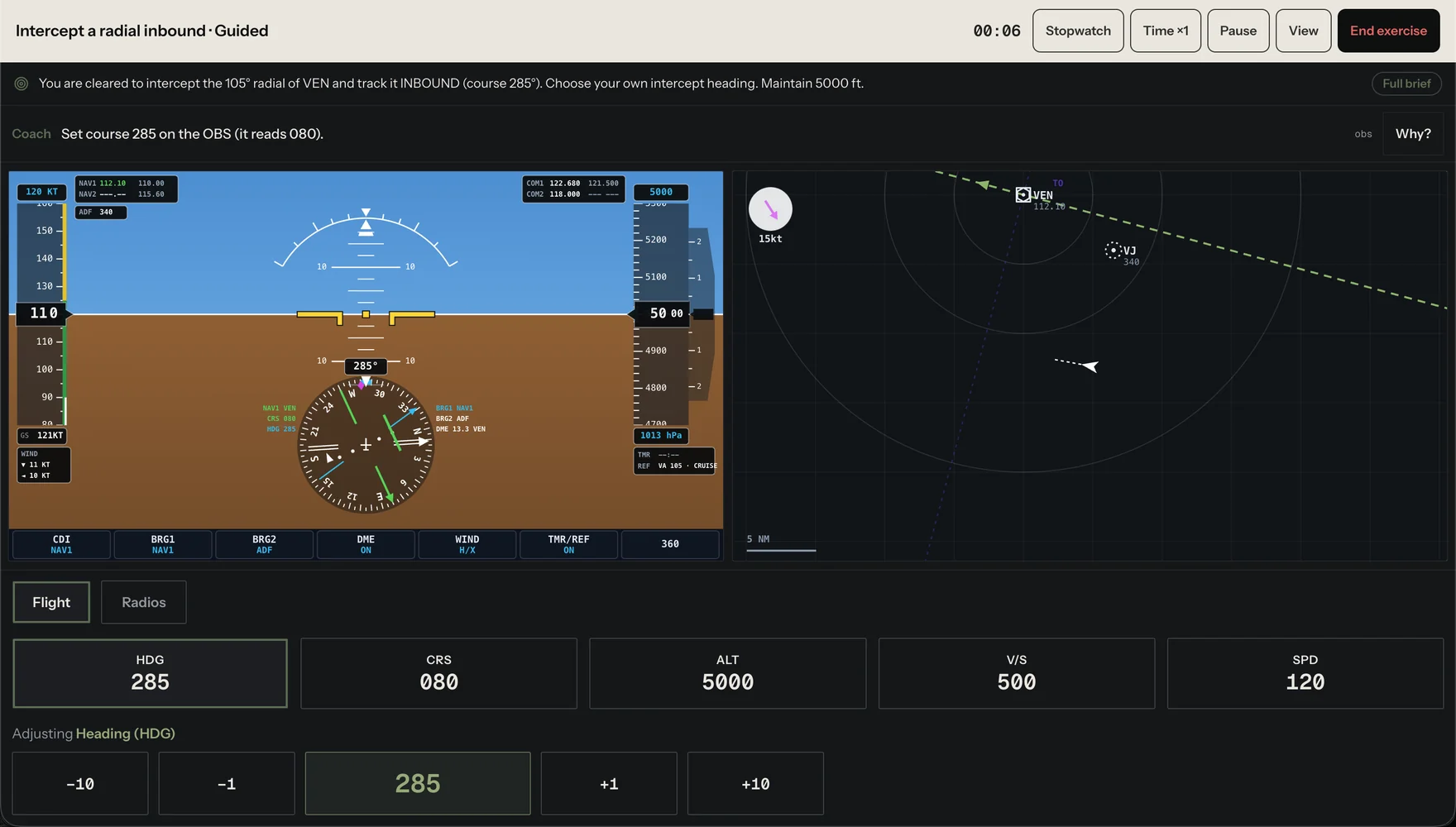
The free tier includes the IFR trainer, so it costs nothing to find out whether this suits how you study. More on how it works is on the features page, and the plans are on pricing.
VOLAR is a training aid. Time spent in it is not loggable towards a licence, a rating or currency unless your ATO says otherwise, and it is not an approved or certified simulator. The same is true of every other tool on this page unless its maker holds an approval saying otherwise.
Learn the procedures themselves from your own authority's material and your school's documents. Nothing on this page teaches you a procedure, and nothing on this page overrides one.
Sources
- Each product's own store listing and product pages checked 2026-09-11
- PilotEdge pricing and plans pilotedge.net
- VOLAR IFR trainer, nine exercises and three panels ifr/lessons/index.js
Questions people ask
Can I practise holding patterns without a flight simulator?
Yes. Most radio navigation trainers fly at a constant speed and altitude, so you work the entries, the timing and the wind correction without flying the aircraft at the same time. That is the part most students need the repetitions on.
What is the cheapest way to practise DME arcs and intercepts?
A free tier, or a one-off app under ten dollars, will cover arcs, intercepts and holds. The expensive options buy you more instruments, better wind modelling or a whole aircraft, not more procedures.
Which instrument should I practise on?
The one in the aircraft you fly, first. Then the others, because the procedure does not change and the scan does, and a check ride or an assessment may not give you the panel you are used to.
Can I log time in a radio navigation trainer?
Not unless your ATO says otherwise. These are training aids, not approved simulators.