How to practise radio calls: every method compared
The radio is the only part of flight training that needs another person. That is why it is the part most students are worst at, and the part almost nobody rehearses. Nine ways to do it between lessons, what each one costs, and what each one is actually good for.
Why the radio is the part that fails
Every other skill in the course can be taken slowly. You can sit with the checklist and find the fuel pump at your own pace. You can read the performance section twice. The radio arrives at the speed the other person speaks, usually while you are also flying the aircraft, and it does not repeat itself for your benefit.
So most students get their radio practice in the most expensive place available, while already busy doing something else. A lesson gives you a handful of transmissions. Between lessons it gives you none.
The gap is not knowledge. Most students can write out a correct departure call on paper. The gap is production under a small amount of pressure, and production is a motor skill. It comes back with repetition and it fades without it. Treat it like landings, not like theory.
Start with what you are required to read back
There is a published list of what you must read back, and it is shorter than you think. Under EASA rules it sits in SERA.8015(e), which names four groups: route clearances, anything involving entering, landing on, taking off from, holding short of, crossing, taxiing or backtracking a runway, a set of values that includes the runway in use, altimeter settings, squawks, newly assigned frequencies, levels, headings and speeds, and finally transition levels, whether a controller gave them to you or you took them off the ATIS. Everything else is read back or acknowledged clearly enough that the controller knows you understood it, and the controller is required to listen to your readback and correct it.
If you fly in the UK, read CAP 413 as well, because the list there is longer. It adds items such as taxi instructions, approach clearances, frequency changes and the type of service you are receiving. Learn only the SERA four and fly in UK airspace and you will be under-reading-back several times a flight. Other countries publish their own differences too, so check your own AIP rather than assuming the rule you learned online applies where you fly.
There are also words reserved for one purpose only. The clearest example: the words take-off are used when an aircraft is cleared for take-off, or when that clearance is cancelled, and at every other point the word is departure. A route clearance is not permission to take off or to enter the runway, and the vocabulary is built so that the two cannot be confused.
Learn the list once and most of what is left is vocabulary. Practise without it and you get fluent at a guess, which is worse than not practising at all.
The free methods
Four of these cost nothing and one costs whatever your school charges for ground time. Together they are a real programme, and most students never run it.
Reading the manual
Work one phase of flight at a time rather than front to back. This is the foundation and everything below assumes it. Where it stops: reading builds recognition, not production. You will know a correct call when you see one and still not be able to say it.
Listening to live traffic streams
Pick one field, one frequency, follow along with a chart, and try to predict the next transmission before it happens. Good for pace, and for the sound of a frequency with other people on it. Where it stops: coverage is heavily North American, which means another authority's phraseology, and listening is passive. Copy the tempo, not the words.
Talking to yourself
Out loud, at working pace, whole calls from the first word to the last. Do not stop halfway to check whether you got it right, because stopping halfway is the habit you are trying to break. Finish it wrong, then do it again. This is the only free method that makes you produce calls rather than recognise them, and it is the one people skip because it feels ridiculous. Where it stops: no feedback, so whatever you have wrong sets.
A classmate on the phone
They read from the manual and give you instructions you did not ask for. You read back what you were given rather than what you were hoping for, which is the whole skill. Swap after ten minutes. Where it stops: scheduling, and neither of you can reliably mark the other.
Ground time with an instructor
The most accurate feedback available anywhere, from someone who knows your syllabus and your airfield. Book it as ground time, say what it is for, and bring the specific calls you keep fumbling. Cost is your school's ground rate, which varies enough by school and country that anyone quoting you a single figure is guessing. Where it stops: cost and availability. Nobody does this four times a week.
The apps and networks
Alphabetical, not ranked. Prices are as published by each vendor in September 2026 and they move, so check before you subscribe.
ARSim, by PlaneEnglish
USD 4.99 per month for VFR content on a twelve month subscription, or 6.67 for six months. VFR and IFR together is 7.99 per month for twelve months. There is a free trial.
A structured radio simulator: 88 lessons of fundamentals, 52 VFR lessons across the phases of flight, 92 IFR lessons, and an airport database of close to 300 fields, with speech analysis marking your phraseology and delivery. The curriculum and the airports are built around US operations, so an EASA student gets the drill but not their own phraseology. Cheapest paid option here by some distance.
ATC One
Free Starter plan with two readback sessions and two multi-phase flight sessions. Pro is USD 14.99 per month, or 119.99 per year with a three day trial.
A conversational AI controller with multi-phase scenarios, readback drills, a phrase builder and written practice exams, with feedback after each session. Their content follows FAA and ICAO standards, which puts it closer to an EASA student than a purely US product without being built for SERA. Their blog and their pricing page quote different monthly figures, so go by the pricing page.
BeWinged
Free for invited members during the beta, with no public price yet.
A voice AI trainer for VFR radiotelephony built specifically on EASA SERA and ICAO phraseology, with a scenario library and an instructor side. It is in closed alpha at the time of writing, so it is not scored below. It is the closest thing on this page to a like-for-like EASA tool and it is worth watching.
PilotEdge
USD 19.95 per month or 179 per year for one coverage area, 34.90 per month or 329 per year for both, with a five hour free trial. You also need a desktop flight simulator, which is a separate cost.
Professional human controllers on a live network, with a structured ratings programme so your progress is tracked rather than felt. Coverage is the western United States on FAA procedures, and you have to fly a desktop simulator competently before the radio practice starts. Excellent at what it does, and a long way from ten minutes between lectures.
VATSIM
Free to join. The desktop simulator is the real cost.
Volunteer human controllers worldwide, including European sectors, with real traffic on the frequency. Coverage varies by sector and time of day, the learning curve is steep, and nobody there is teaching you. Excellent practice once you are competent, and overwhelming before that.
VOLAR
Free tier, no card. Paid plans start at EUR 6.99 per month billed yearly (EUR 83.88), or EUR 10.99 month to month.
This is ours, so read the rest of this page before you read this paragraph. You speak, an AI controller answers, and the readback is marked by a correctness engine rather than a script, so it can name what was missing instead of only telling you that you were wrong. The traffic you are told to follow is in the circuit with you, so the instruction has to be flown as well as read back. It runs in the browser with no install and no hardware, and the radio trainer is in the free tier.
Where it stops: our practice aerodromes are fictional rather than a database of real fields, which two of the paid products above do have. We are a browser app rather than a native mobile one. And an AI controller is not a person, so the instructor above still scores higher on the thing that matters most.
The comparison
Four things, each scored out of 5. Cost sits outside the score, because free does not make something effective and expensive does not make it good.
- Speaking. Does it make you produce calls out loud, or only recognise them.
- Feedback. Does something tell you what was missing, not just that you were wrong.
- EASA fit. Is the phraseology and the airspace the one you are training in.
- Friction. Can you do ten useful minutes tonight, with what you already own.
One thing to be straight about: we have used our own product and not most of the others, so these scores describe what each tool is built to do, taken from its own published description, rather than how well it does it. Some tools in this market publish figures for flight hours or money saved. We have measured no such thing, and we are not going to repeat someone else's number as though it were ours.
| Method or tool | Cost | Speaking | Feedback | EASA fit | Friction | Total |
|---|---|---|---|---|---|---|
| Reading the manual | Free | 1 | 1 | 5 | 5 | 12 |
| Talking to yourself | Free | 5 | 1 | 5 | 5 | 16 |
| A classmate on the phone | Free | 5 | 3 | 4 | 2 | 14 |
| VATSIM | Free, plus a sim | 5 | 2 | 4 | 1 | 12 |
| BeWinged | Free in beta | Not rated | ||||
| VOLAR free tier | Free | 5 | 4 | 4 | 5 | 18 |
| Live traffic streams | Free, app USD 4.99 | 1 | 1 | 2 | 5 | 9 |
| ARSim VFR | USD 4.99 / month | 5 | 4 | 2 | 4 | 15 |
| ARSim VFR and IFR | USD 7.99 / month | 5 | 4 | 2 | 4 | 15 |
| VOLAR Pro | EUR 10.99 / month | 5 | 4 | 4 | 5 | 18 |
| ATC One Pro | USD 14.99 / month | 5 | 4 | 3 | 4 | 16 |
| PilotEdge | USD 19.95 / month | 5 | 4 | 1 | 1 | 11 |
| Ground time with an instructor | Your school's rate | 5 | 5 | 5 | 1 | 16 |
Scroll the table sideways to see every column.
Read it twice. The only 5 in the feedback column belongs to an instructor, and the totals are only high where frequency and friction are weighted as heavily as quality. A tool you will open tonight beats a better tool you will open in a fortnight, which is the whole reason a browser app sits above a professional controller network on a list like this.
What we would actually do
On no budget. Read the manual, one phase at a time. Talk to yourself out loud for ten minutes every other day. Get a classmate on the phone once a week. Take the two calls you keep fumbling to your instructor as a question rather than as a lesson. That is a real programme and it costs nothing.
On a small budget. Add one tool that marks what you say, and use it for ten minutes a session rather than an hour at the weekend. Which one depends mostly on the authority you train under and whether you want a real airport database or your own phraseology.
If you already fly a desktop simulator. Add a controller network. You have already paid the expensive part.
Whatever you do, book the ground time. Nothing on this page replaces thirty minutes with someone who knows your syllabus.
A session that fits in ten minutes
- Pick one phase of flight. Ground, departure, circuit, arrival. One only.
- Say the call you would make, out loud, all the way through.
- Say the reply you expect, out loud, in the other voice.
- Read it back.
- Check the exchange against your manual, then run it again until it is dull.
Ten minutes of that four times a week will do more than an hour on a Sunday. And pick one aerodrome, one runway and one traffic pattern, and stay there until it is boring. Learning the calls and learning a new field at the same time doubles the work and halves the repetitions.
What this looks like in VOLAR
You speak, an AI controller answers, and the readback is marked on what it actually contained. The traffic you are told to follow is in the circuit with you.
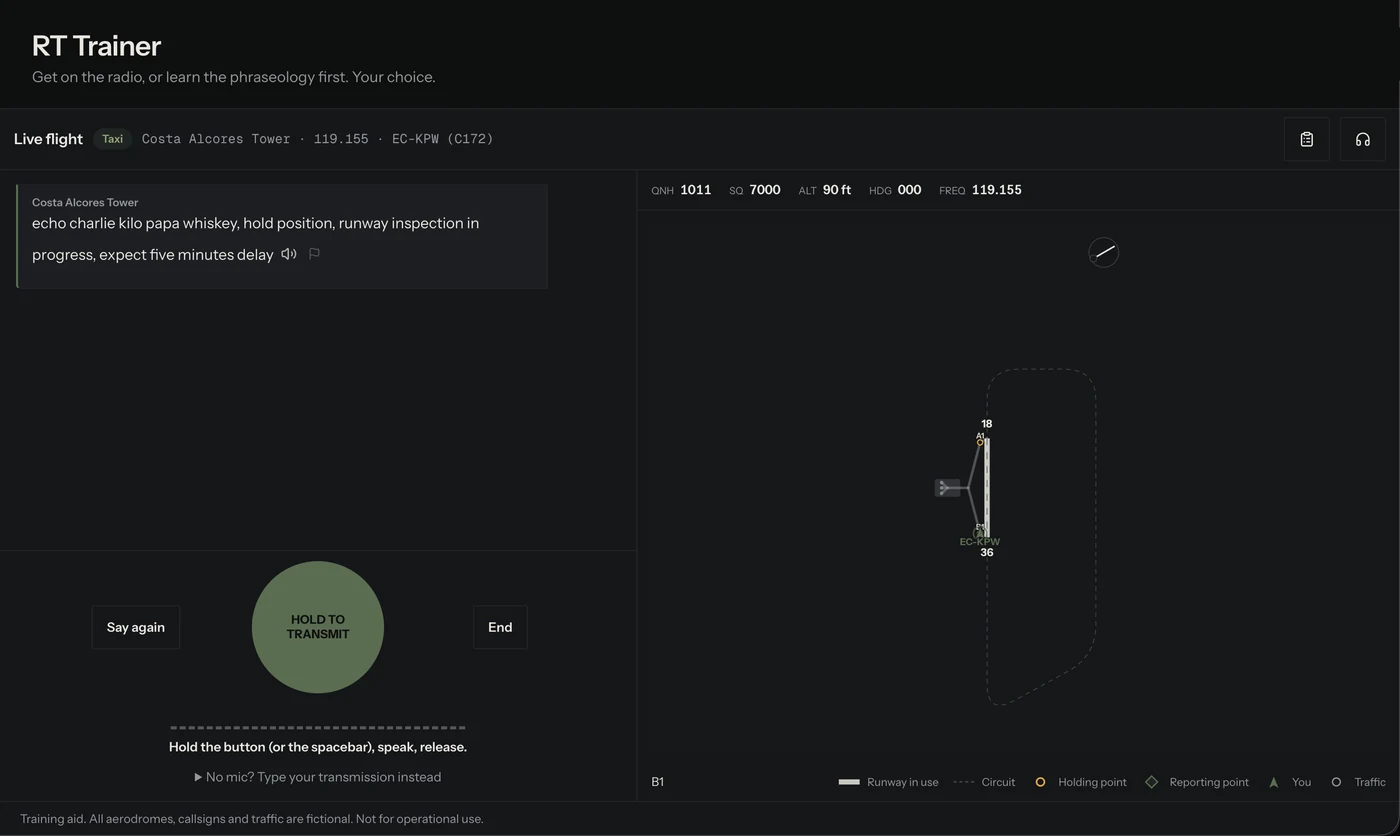
The free tier includes the radio trainer, so it costs nothing to find out whether this suits how you study. If your school is on VOLAR, the same practice runs alongside quizzes built from your school's own SOPs. If it is not, you work from the published EASA or FAA reference library, and there is a button in the app to ask your school to join.
More on the radio and IFR trainers is on the features page, and the plans are on pricing.
VOLAR is a training aid. Time spent practising in it is not loggable towards a licence, a rating or currency unless your ATO says otherwise, and it is not an approved or certified simulator. The same is true of every other tool on this page unless its maker holds an approval saying otherwise.
Practise against your own authority's radiotelephony manual and your school's procedures. Where either differs from anything here, they win.
Sources
- Read-back of clearances and safety-related information, Commission Implementing Regulation (EU) No 923/2012 SERA.8015(e)
- UK CAA Radiotelephony Manual, Edition 24, effective 1 July 2026, Chapter 2 CAP 413 §2.65–2.71
- Standardised phraseology SERA.14001
- Prices taken from each vendor's own pricing page 2026-09-11
Questions people ask
How can I practise radio calls at home?
Out loud, one phase of flight at a time, with the readback rehearsed as carefully as the request. Reading the calls silently builds recognition but not production, and production is the part that fails on the frequency. Ten minutes several times a week beats one long session.
What is the cheapest way to practise radio calls?
Talking to yourself with the manual open. It costs nothing and it is the only free method that makes you produce calls rather than recognise them. The paid tools add the one thing it cannot: something that tells you what was missing.
Does listening to live air traffic help?
For rhythm, speed and the sound of a busy frequency, yes. For phraseology, only if the stream is from your own authority's airspace, because the words differ. Listening also does not build production: at some point you have to speak.
Can I log radio practice towards my licence?
Not unless your ATO says otherwise. VOLAR is a training aid, not an approved simulator.